Monday, September 28, 2015

Homework for 10/5 Blog Post #13 (explore digital citizenship)

Catch up on missing posts. See Mrs. Poling if you need help.

New Posts for: 10/5

Blog Post #13-Digital Citizenship Concepts Exploration
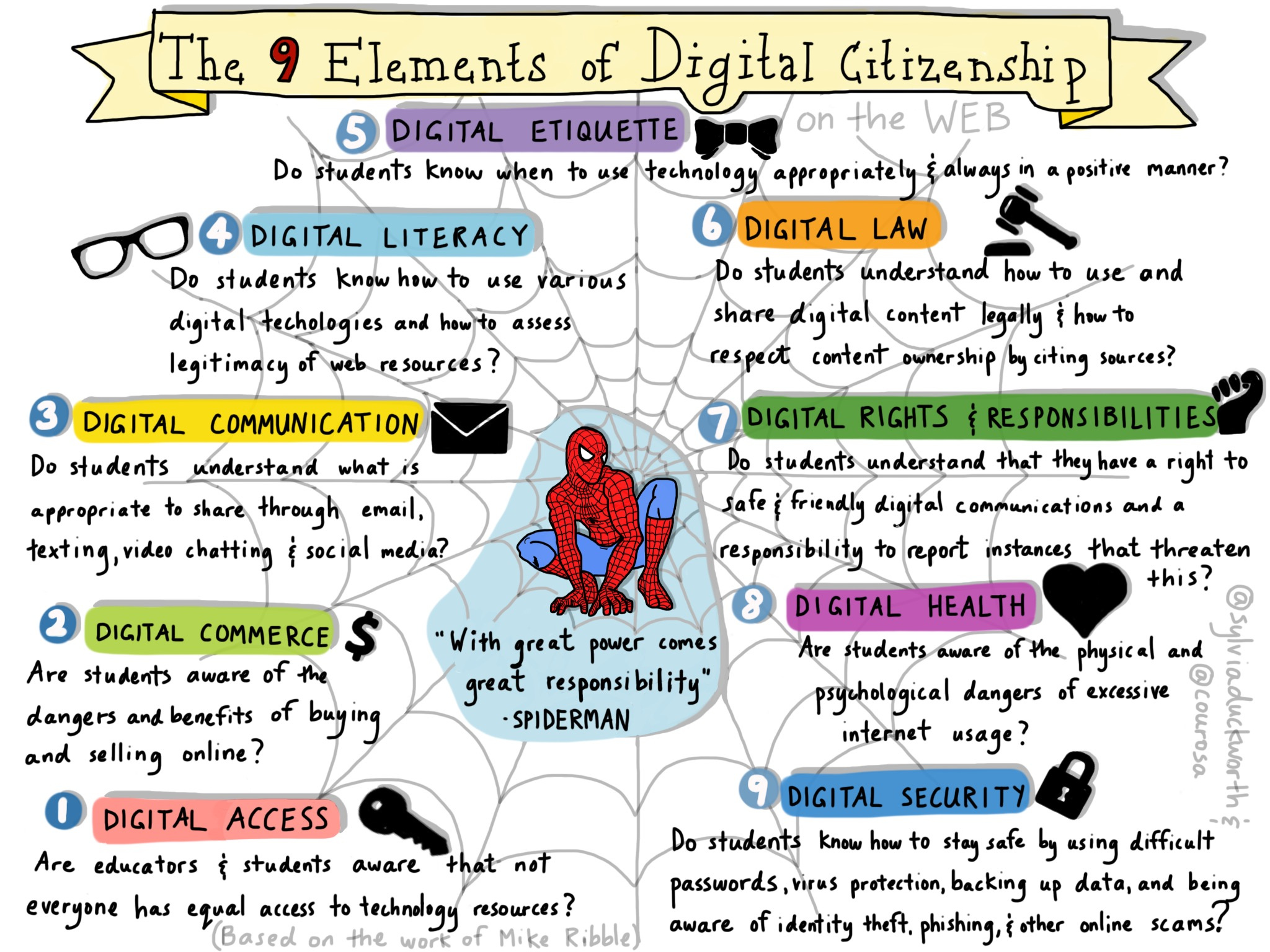
What is Digital Citizenship?  Which elements interest you?

Read:
9 C's of digital

Look at:


@sylvia duckworth


Then visit page 2 of this PDF and decide which circles you would prefer to research!!

Post:
Which parts of digital citizenship interest you most?  Share the above categories on your blog!

Tell me one wonder you have about digital citizenship and your grade level or content area.


In Class, 9/28 Monday Develop Good Informational Literacy (Digital Citizen group project and PLN)

Monday 9/28
Devo:  Tessa

Learning Target:
Concepts:
  • The students will develop their informational literacy as they research quality resources/ideas for two projects:  
    • digital citizenship (a group project)
    • PLN (indvidual project)
  • The Students will connect the class activities and the course goals. 
  • The students will explore the common core standards to develop a foundation of learning targets for their future classrooms.  
  • The students will explore and choose favorite tools or content to encourage their spiritual disciplines and growth. (and add to their PLN)
  • The students will be self directed learners by setting a goal, and then updating the steps and progress made in learning a skill related to 21st Century Learning.  
Tools: 
  • The students will use google classroom to report on their homework completion, and get feedback from Mrs. Poling.    code: mgiah3
  • The students will be introduced to google drive and forms.   

Activities:
What have we done? and where does it fit?  

What's a PLN?  You'll be creating one. 

Digital Citizenship Research Project

As time allows: 

  • Show google drive, calendar, forms. 
  • google classroom


Friday, September 25, 2015

Class Week 5 Friday 9/28

Devo: Liz

Research Skills with Ms. Young

Learning Target:After instruction, learners are expected to effectively navigate Google to find non-scholarly information. Additionally, after instruction, learners will have a framework and system for evaluating websites.

I can demonstrate digital literacy by developing my information literacy skills.  


Showed Stones (a book that tests 1st grade literacy skills)

Information Literacy Instruction:  Beth Arjona

Types of Information:

  • Trade (Instructor)
  • Scholarly
  • Popular 
Showed examples of magazines and we voted: (to identify)
National Geographic (popular) 
Time (popular)
Reading Today (trade)
Reading Research Quarterly (scholarly) 
Children's Mathematics (trade)
Instructor (trade)

Class Make Up:  find one of each type and tell me when you would use that type of publication.

Goal-to know what type of information you are looking for (scholarly, trade, popular) before researching so you can research effectively.

Google (showed in images) that you can search by color (even for a book on Calvinism that is red).  

138 tips 

Class Make Up:  Share your favorite 15 tips in your post.   (we explored for 5 minutes and then shared our tips with the group!) 

controlF (lets you search on that website)


Article discussion: What tips for checking the facts? 
Credibility
Accuracy 
Reasonableness
Support

Autism and Vaccines (should I vaccinate?)  
Look at KNOW vaccines
Share how you know if it is C,A,R,S and your overall Evaluation.(is the information appropriate to help you decide if you are going to vaccinate, or if you used this site, would you be vaccinating or not vaccinating based on not credible content.)

In class we shared here: the group chart


Monday, September 21, 2015

Class- Monday 9/21 Presentations, Quality Tools, Spiritual PLN

Devo: Brooke


Presentations: Please evaluate
Heather- Gale
Anna and Stephanie-Atomic 
Hannah and Elizabeth-Britannica

Activities:
Press Here Book
Google Docs: drive.google.com
Forms: https://docs.google.com/forms/

Quality Learning Discussion
Entry Ticket- What makes a quality tool?  post here your ideas, thoughts
What is your definition? and How does 21st Century Learning expand your definition?  
  • Blooms Taxonomy
  • Digital Literacy
  • Gadgets
  • Tools (free or purchased online)
  • Multiple Intelligences 


Homework Week 5 Blog Post 10, 11,12, due 10/2

Introduced on Monday, 9/21
Due: Friday 10/2 (or before)

Blog Post 10:  Online Common Core Post

Read:  Take at least an hour to learn about the Common Core (in general and in Iowa).

Visit these links:
Core Standards
https://iowacore.gov/
21st Century Core
Iowa Common Core Resources
Think:
  • what is the core? How does it relate to technology and 21st Century skills?
  • what are the main components? 
  • why do you need to be aware of it? 
  • what was helpful or what was hard for you at this site?
  • do you have a goal related to this knowledge that all teachers need?
  • What is DOK?
Post Blog #10: a summary- what is the core? AND what/how do these resources help you be prepared to teach with the core?  Are there any parts you need clarity or interpretation?

indicators of quality:  an explanation of the core, components, and what is depth of knowledge?  And your evaluation of the resources.  

Blog Post 11:   Spiritual Resources Post

Below are some links to online resources related to spiritual growth, knowledge, or disciplines...
I want you to search and find some QUALITY resources for your christian life.
Write a post that explains what makes your selections quality and why/how you think you will use these resources.  If you don't find anything that you will use regularly, or that fits your needs, post about what you might be looking for and just haven't found.

Here's a variety to get you going!

Read:  Infographics :  Bible Characters on Survivor 
OT yearbook    (my wonder: How many of you may grow up and create fun infographics like this? )

Think/research/share:  what tools online do you know of an use for your spiritual development? (ideas below)

Post Blog #11- What tools that I introduced are you thinking you will try? and what tools do you already have? what other things might help you in your spiritual walk? (are you going to try a tool, join a community, follow a blogger/instagram,...)

Indicators of quality: 
  • at least 2-3 paragraphs about how you are or want to try using something online to encourage your spiritual life and to hold fast the Word of God!  
  • You choose to talk about at least one: A plan or a testimony of use or an evaluation of options (or share all three).
Research/Reading/Thinking Examples- starting point.  (you don't have to look at all of these, but you can look at one or two in depth, or explore at a surface level several, it's an exploding market online of resources) 
Why Memorize? Who Memorizes?

Try these links or look at the holy experience examples ( Is this learning at a higher level using technology?? does it work for you? 


My blog thoughts:  (and my livebinder link to more resources)

An app, cards, and other options....children desiring God resources


Blog Post 12: Goal Progress

(No reading required) 
Post:Update on your progress meeting your 1st goal.  What steps have you taken? and what steps need to be a priority? Do you need to just commit time to this goal? do you need to learn more about something? do you need a tutor/mentor?  Think it through and share the plan and progress!  (and if you've met the first goal, set a new one, that's great, or maybe you need to take this goal and break it into smaller goals? whatever will bring you success!) 

Indicators of quality post: (at least one of these bullets is met)

  • share examples of activities or reading that are helping you meet your goal.
  • share how much time you have committed to this goal (and what happened in that time)
  • share your plan to meet the goal (a timeline, smaller goals)

Friday, September 18, 2015

Presentations 9/18

Devo: Amanda

Make sure and evaluate all of the presentations- (and your own!)

Please note- there is one more task for homework for next Friday. I changed the homework post. One of my tasks I moved to the 28th. After class I hope to post the homework for 10/2 as well.


Groups

Present in this order:
1. Learn360
Amanda

2 and 3. Sirs Issue
Liz and MacKenzie
Teen Health
Nakiah

4. Gale
Heather and Sarah C

5. Scholastic Bookflix, TrueFlix, FreedomFlix, Science Flix
Kayla, Julie, Brooke, Tessa

6 CultureGrams
Sarah B and Josie

Monday:  7 Atomic Learning
Anna and Stephanie

Monday:8.Britannica
Elizabeth and Hannah

Monday- Heather Gale (elementary


Monday, September 14, 2015

Class Week 4- AEA exploration and show/tell Monday 9/14

Devo: Got Service?

Sample Presentation:
Tool featured:  Teachingbooks.net

Presentation made with Slides a free online presentation tool, that is fast and easy! I had never used it before this project, and I made my slide show in an hour (or two) while I was clicking through my site!

How did I do presenting?

Who uses this tool?

Review and recap on assignments

Work Day!

Sign up for Devo Day and AEA tool

Presentation Guidelines

Homework for 9/25


Blog Posts Posts #7 & 8, 9 for 9/25 and one for 9/28

For September 25th

Our learning targets (or I can statements)


  1. I can think about what makes a quality tool for online learning/teaching.  I have an  idea or concept of best practices for learning.  
  2. I have learned about the AEA tools and know what seems to help or fit me and my future teaching.  
  3. I know what a PLN is, and am thinking about how I want to create a PLN for myself, and what tool might help me. 
  4.  I will watch a video and come to class ready to share when I would need different types of articles (scholarly, peer-reviewed, trade journal, and popular).

Blog Post #9- Mrs. Arjona is teaching on 9/25 

Watch this video on the types of information available to you: https://vimeo.com/82685184
Then, think about your future as a professional educator. In 1-2 sentences, describe a situation in which you would use or need....
-A scholarly, peer-reviewed article
-An article from a trade journal
-A popular article

You should also review or read anew this article from English that is a great explanation of research


Blog Post #7 AEA tools

Which AEA tools do you like the best? why?

Make a top 10 list or choose your most functional 3 sites, and share what makes these paid for tools worth the $.

If you don't see tools that you will use, then explain what you might want to look for, and what is closest to something that you could see fitting into your future classroom.

indicators of quality/grade:

  • thoughtful and reflective statements (think evaluative, application, levels of blooms)
  • shares at least 3 preferred tools (in depth) or a top 10 list (with an opening/closing statement as to why these are YOUR new preferred sites.)
  • links to the sites work.
  • if you didn't like the tools- then list or even search for something that is better for you and share one or two examples.  


Blog Post #8 Online Learning and a PLN  (now due 9/28) 


Reading:  Ethical Island and Characteristics of Online Learning
Reading: What is a PLN

Pick from the following bullet points and EXPLORE to gain understanding.  Look at the thinking section for ideas on WHAT to read about.
  • Infographics to think about online learning: (this is more of a aha- and moving towards I can talk about learning theory online as you've been exposed to Bloom's and some online concepts (PBL, mastery, engaged learning, but what does it look like, Mia does a great job with infographics giving examples of best practice ideas that you should get!) 
  • Tools are a factor for online or 21st century learning here are examples. (you already use email, facebook, blog, youtube, apps...)
    • Tools for free (and tutorials)  (some of these are older, but if you click on a link, it takes you to a challenge and it explains what the tool is, how it might be used, and then teaches you how to use it, so for THINKING it's a good novice place to start) 
    • Wiki of tools (and starter sheets)
    • Study Skills Tools  A new tribes instructor shares tools he likes or wants to explore. 
  • PLN (this is an intro level, just getting the concept down as to what it is for next week's discussions, so pick and choose for about 20-30 minutes from this, or the links that these lead you to) 
Main topics shared:  

Thinking:  

  • What does good teaching look like? sound like? what tools are out there? and how do I keep track of all the online favorites?  
    • what tools are needed in a 21st century classroom?  
    • how are these tools used by students? teachers?
    • does your content area or grade level have specific needs for their learning environment? 
  • What's a PLN? What type of PLN do I already have?  How will I keep track of my online PLN? and how will I choose which formats fit me? 
    •  Think about PLN, and talk about what aspects or techniques fit you? (will you pin on pinterest your PLN? will you tweet your way through #chats? will you have a mixed collection of interactive and following resources? 
  • Overall thoughts on this learning and 21st century theory
    • how does your teaching philosophy fit with the new concepts you've been exposed to?  
    • what part of the theory is confusing to you? 
    • do you have wonders or see concerns, problems, or hurdles?  
    • do you need more instruction and information on these theories (or one of these theories)? if so which one? 

Post on your blog post #8:  

    • Share your thinking, pick a few of the questions above to comment on your understanding and skill related to: online learning, tools, and PLN
    • Find a link to a resource, video, or tool that you think fits your thinking about teaching and learning and include it, and explain how it fits.   
    •  Share what might be a good place for you to start with creating a PLN (what tool or social media)
    • Share a paragraph or two about your current PLE or PLN.  What have been your learning supports, connections, and places to get help?  What are your new goals?  
  • Indicators of quality/grading
    • addresses the bullet points from post #8 list
    • shows your thinking about online learning and a PLN (For some it will be defining these terms and sharing what you now KNOW it is, and for others it will sharing your personal connections, or your passion to integrate these ideas into your own learning and ultimately teaching.   
    • proofread, error free, on time

Friday, September 11, 2015

Class Week 3 Friday 9/11

Learning Targets:
  • The students will expand their definition of digital literacy by sharing what their groups aspect included.  (and the key terms)  
  • The students will interact with the concepts from the assignment on learning theory with one another, and develop a personal learning/teaching philosophy or framework for their future classroom.  (peer discussion, whole class discussion)
  • The students will look at a quality resource that the state of Iowa provides for EVERY teacher and student in state, and personally evaluate it, develop expertise in ONE tool, and prepare a presentation for their peers for Monday's class.
  • The students will take their growing thinking of learning theory and begin to think about, what makes a quality online resource or tool? what are the common characteristics? 
  • All of this will lead to the task of creating your own PLN and your own list of resources and tools! 

Devo  a teaching tool I created, but an example of resources or inspiration for christian growth!

Empower Attendance on the Smart Board

Learning Theory and Digital Literacy Conversations

Mrs Poling Share: Teaching Books

Iowa Tools.... a link that explains what EVERY site does.
Logon: Ebic4321 pw: given in class and email

Simple Research spots...

What do each of these sites do?


Start Exploring...

Sign Up for Devo Day and AEA tool

Keystone AEA (updated annually) access given to teachers, kids and parents!
 log on: ebic4321 password: shared in class

Homework Week 3 for week 4

Presentation September 18th
Blog Posts 


Homework Week #3 Blog Posts 3,4,5 due 9/21

All posts are due by Monday 9/21 

Blog Post #3: Bloom's


Title: Blooms Taxonomy
Share from the following concepts:   What I think and What I wonder (about learning and teaching with all this knowledge of Blooms, PBL, engagement, flipped classroom), .... and what questions do you have.    If you have time, google a question, and share a result, or share something that you think I should know about!

Grading look fors:   what do you think, what wonders, concerns, questions do you have?  


READ this to help you KNOW and understand Blooms!

Learning Theory explored...
  1. Choose at least 5 links to read or watch from the list below.  
  2. come to class ready to discuss what Blooms Taxonomy is all about! 
Some bloom's videos/resources- I've used...
Not videos:


Blog Post #4 :  Digital Literacy
Part one:
How literate are you? Think about the five areas discussed in class (Or explored on your own).  Where are you on a scale of 1-5 (1 no ability, 3 ok literacy, 5 I can teach this) in each area. Talk about why or what you need to do to improve that number.

Learn the Basics

Build digital literacy skills by selecting from the categories below.
pictureUsing a Computer or Mobile Device
Learn how to use the mouse, keyboard, icons, and folders
pictureUsing Software and Applications
Use software applications: word processing, creating spreadsheets, tables and databases
pictureUsing the Internet
Search the Internet, use email, register on a website
pictureCommunicating on the Web
Share photos and videos, communicate using social networks, learn to be an informed digital citizen
pictureChild Online Protection
Help children learn to be responsible and make informed decisions online

Part two:
What value does digital literacy have to you? do you love social media? gadgets? communicating on the web?  software or apps? Which parts of digital literacy energize you? and what parts scare or exhaust or intimidate you?

Part three:

Look at these links....

Quality Tools...
http://www.teachthought.com/learning/9-characteristics-of-21st-century-learning/


Blog Post #5 :  Goal #1  Blog Post:
  • what's one goal you have with 21st century learning? online tool?  and what do you want to learn? 
    • choose a two week goal
    • it could be to learn to: ______ OR it could be to find a tool or app like powtoons, prezi, or blogger, or___)  OR it could be that you are lost in the concept of 21st century learning and want to research the teaching part before the tool part...you decide
    • then decide to: 
      • to be able to independently make it function?
      • to find three ways to use is in your future classroom?
      • to not be afraid of ______? 
      • To find three ways to learn how to use it more effectively? or a tutorial?  
      • What skills do you have related to these tools and what skills do you need?


Homework Week #3: AEA resources Presentation/Blog Post 6 due 9/18

Presentation #1- show and tell AEA website and Blog Post 6
Explore the AEA sites, especially the one you signed up to review..

Keystone AEA (updated annually) access given to teachers, kids and parents!
 log on: ebic4321 password: shared in class
What do all the sites do?  

Show and Tell on Friday, September 18th 

Create a blog post #6  (or padlet or prezi with the following info, and link it to your blog)  Then share this link with us during your presentation.  Here's the form we will evaluate the show and tell with.  
In Writing, in a blog post or presentation tool that we are linked to:  
  • tell us the purpose of the site and the features
  • show us three examples for a use (could be by the teacher, or the students, in class or as an assignment). 
  • tell us what ages, grades, and content areas can use it.  
  • if their is a tutorial or helpful handout, link us to it, so we can learn how to use it.  
Your presentation should be a slideshow, screen shots, set of SHOW examples:
  • at least 2-3 minutes per person.   No more than 5 minutes solo, 8 minutes pair, 12 minutes trio.   
  • state the purpose of this resource and it's scope (or usefulness).  List any problems or concerns you discovered.
  • showing us the site from your 'expert' point of view.  
  • giving examples of kid AND teacher use and something that will inspire us to go back. 
    • pick one kid use to show and let us see what we would do.
    • pick a teacher lesson example and show us what she would show/do

Friday, September 4, 2015

Week Two Class #4

Devotional Thought..Nobody has it all together (3:34)

Tool Commercial: Teacher Tool Teaching Books  (set timer for 5 minutes)
log on: ebic4321
password in class

Log on and if you are:
      secondary ed- raise your hand when you have linked to the article for how this is useful for you. 

      elementary ed- raise your hand when you have linked to info about an author or illustrator you like.

Learning Targets:
  • The students will define digital literacy in order to: start thinking about digital literacy, competency, tools, and gadgets.  The students will show their current thinking and skills by completing an in class activity.  
  • The students will be given a Digital Literacy Competency Idea page to begin mapping out their learning for the semester.
  • The students will continue developing a 21st century vocabulary.  
Maybe 
  • The class will begin to think about what a PLN (Personal Learning Network) is, why it is needed, how to organize it, and what should be in it.  

Discussion:
  • Define Digital Literacy
  • Define Digital Competency- what factors do we need?  
  • Define Digital Native-- look at the links and the infographics below....
  • Questions to define digital native
    • is there a digital divide?
    • Are you a digital native or immigrant? why?  
      • what would it take to change your status? 
      • what label do you prefer?
  • Create a working definition for: 
    • tools
    • gadgets
    • Web 2.0 tools (Web 3.0 tools)
    • Social Media
    • App
    • Wiki
As time allows- discuss learning theory, blooms, and the homework tasks.  


Digital Native in Marketing

native advertising resized 600